Product Design ∙ Friday, September 11 2026Flow-first vs. screen-first: structuring user journeys before interface design
By Acid Tango
A screen should be the last decision in a design process. This piece breaks down why sequencing the flow before drawing the interface saves teams from expensive rework, and when it's worth skipping the map altogether.
Sequencing decision: flow architecture before interface layout
Digital product teams face a sequencing decision early in the design process: build the interface first, or map the user's path through the system before anything else. Screen-first design starts with visual layout, then works backward to define how users move between states. Flow-first design reverses that order. Functional logic, system states, and decision paths get defined before a single screen takes shape.
The practical difference shows up when requirements change. An interface built without an underlying flow structure ties navigation logic to a specific layout. Adjusting one step later on can mean rebuilding components and reworking navigation across multiple screens. A documented flow absorbs that same change as an edit to a diagram, resolved before any interface work starts.
This ordering functions as an alignment stage. Product managers, designers, and engineers work from the same picture of system states and user intent before layout decisions lock anything in place. Ambiguity about what a screen needs to do gets resolved on paper, long before it would otherwise surface three sprints into a build. Structure is cheapest while it's still just lines on paper.
From flow map to interface behavior
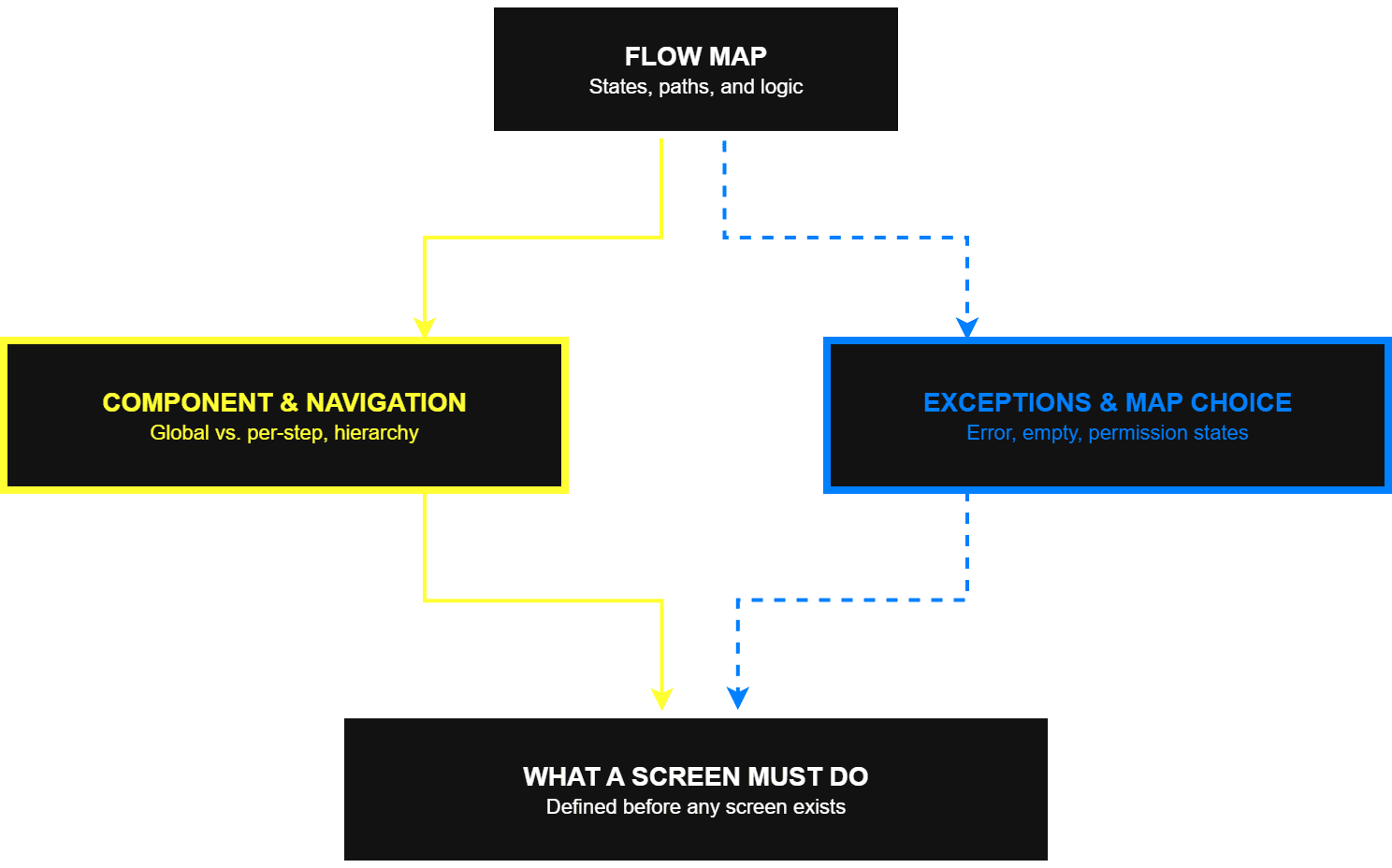
A flow map defines how interface components behave, how information gets organized, and how responsibilities split across screens once the interface exists. That function goes beyond documentation; it shapes real implementation decisions.
Component reuse and navigation structure
A complete map of every step across a product surfaces repeating interaction patterns. Design teams can then separate global components (persistent navigation, standard form controls) from screens built for one specific step. That separation keeps a design system from accumulating redundant variations of the same element.
This logic applies to navigation and information hierarchy too. What a step requires, filtered by platform constraints and accessibility needs, sets what appears on a screen. Interfaces built without that input tend to accumulate competing actions that a flow map would have separated out.
Edge cases and artifact selection
Designing only for the ideal path leaves gaps that surface once real users hit them. A flow map forces three categories of edge case into view before any screen gets built:
Error states. Input validation failures, network timeouts, permission refusals: each needs an actionable recovery message and its own accessibility focus order.
Empty states. What an interface shows before any data exists: a first-time login, a dashboard with nothing tracked yet, a search that returns zero results. Skipping this leaves users staring at a blank screen with no next step, which is often where drop-off spikes hardest.
Permission boundaries. What a role can see, and what it can't.
The edge cases are where a product's real maturity shows; they hardly ever are the happy path many teams like to demo. Which artifact fits depends on how complex the problem is. A single, linear path (a password reset, for instance) works as a task flow. A step sequence where spatial layout matters gets a wireflow, combining steps with rough screen sketches. A flow spanning multiple touchpoints and a broader user context calls for a journey map. A process reaching beyond the interface, into support systems and internal operations, needs a service blueprint that connects user-facing steps to what happens behind them.
Measuring whether a flow works
A flow needs two kinds of validation, gathered at different points in the process: qualitative testing while the design exists only as a diagram, and quantitative tracking once it ships. Performance data alone doesn't cover it. Interaction to Next Paint, part of Google's Core Web Vitals, measures how quickly an interface responds to a click or keystroke: a measure of technical responsiveness, not of whether a sequence of steps makes sense to the person navigating it.
Testing before the interface exists
Flow maps get tested with users before screens are polished, sometimes while the interface is still just a sketch. A moderated walkthrough of a low-fidelity wireflow or a paper prototype exposes where a person hesitates or misreads a step. Catching that at this stage means restructuring a diagram, not rebuilding a shipped screen.
Measuring the flow after launch
Once a flow ships, four numbers show whether it holds up in practice:
Task success rate. The share of users who reach the end state they set out to reach.
Step-level drop-off. Where in the sequence people leave. A single high-drop step (a checkout's payment screen, for example) usually points to one fixable source of friction, not a flaw in the whole flow.
Time-to-completion. How long the full path takes, start to finish.
Post-task satisfaction. A short survey right after the task, asking how satisfied someone felt (CSAT) or how much effort the task took (CES), catches friction that funnel numbers miss, including cases where a user finishes a flow but leaves frustrated.
Neither kind of evidence replaces the other. Early testing catches structural problems while a fix costs nothing more than editing a diagram. Post-launch metrics confirm, or challenge, whether the structure holds once real usage patterns show up.
When flow mapping is worth the time
Not every design task needs a full flow-mapping exercise. For a simple, low-risk task, that much rigor mostly adds paperwork without adding real protection. The judgment call comes down to three factors: how complex the underlying process is, how much the system's state varies, and how expensive a late structural change would be.
Factor
Points toward flow-first
Points toward direct screen design
Process complexity
Multi-step logic, branching paths, several permission levels interacting at once
A single, well-scoped action, such as editing one profile field
State variability
Real-time validation, live data dependencies, several possible error conditions
Static content, or a small number of predictable states
Cost of a late change
A structural fix would touch several connected parts of the system
The screen sits in isolation, easy to revise without side effects
In practice, identity verification flows or checkout processes usually land on the flow-first side: the branching logic and compliance requirements make a late restructuring expensive. A minor iteration on an existing screen, built on components a design system already defines, rarely justifies the extra step. Good discipline protects judgment; it doesn't replace it.
Final thoughts: net effect on the design process
Moving the sequencing decision earlier changes what a screen is meant to do. An interface built from a mapped flow serves a function defined ahead of time. One built without a flow map usually ends up with its role guessed from how the page looks after the fact.
Editing a diagram costs less than reworking a finished screen, so most fixes happen before a single component gets coded. Edge cases (errors, empty states, permission limits) get identified before a developer picks up the ticket, not after a user hits one in production. And measurement stops relying on technical performance figures on their own, folding in whether the sequence itself holds up for whoever has to move through it.
None of this determines the final interface. It names the problem that interface needs to solve before anyone draws it. Screens are downstream of decisions; getting that order right comes first.
Frequently asked questions (FAQs)
1. Is flow-first design compatible with agile sprints, or does it slow delivery down?
Flow-first design is compatible with agile when applied selectively: mapping complex, multi-step journeys before the first sprint that touches them, while allowing simpler tasks to go straight to screen design. The upfront clarity on states, branches, and edge cases often reduces mid-sprint rework and handoff friction, so the net effect on velocity is positive for high-risk areas, even if a small amount of time is spent on diagrams before development starts. The pressure to skip that step isn't hypothetical: recent research on design practice documents how hybrid work and faster digital tools are already pushing teams away from structured, lower-fidelity groundwork, even where its diagnostic value hasn't gone away [2].
2. How do we avoid flow maps becoming outdated documentation that no one reads?
Treat flow maps as living artifacts tied to specific epics or features. Store them alongside tickets and design files, and update them when branching logic or states change. When a flow map is the source teams consult to understand "what this screen must do," it stays relevant; when it's just a PDF in a folder, it naturally becomes shelfware.
3. Can flow-first design work in teams that don't have dedicated UX researchers or analysts?
Yes, but the validation approach needs to be lighter. Even without dedicated researchers, teams can run quick moderated walkthroughs of wireflows with a few internal users or customers, and instrument key flows with basic funnel analytics and task success tracking. The core idea is to shift some validation earlier and make it proportional to the complexity and risk of the journey, without adding a full research operation.
4. What's the relationship between flow-first design and a design system? Do they conflict?
They are complementary: flow-first design clarifies which patterns and components are truly needed and how they connect across steps, while the design system provides the reusable building blocks to implement those flows consistently. A well-governed design system benefits from flow maps because they justify why certain components exist and where a new pattern is genuinely required.
Elevate product development lifecycle with evidence-based validation. Explore five essential quantitative UX frameworks designed to validate user workflows and measure interaction efficiency.
Continuous UX testing reduces team bias, lowers development costs, and validates your product design decisions with real users. Dive into the principles you should not omit when you develop a digital product.
Analytics show where users drop off, but not why. This guide breaks down five qualitative UX research methods, from moderated usability testing to contextual inquiry, helping product teams diagnose the psychology behind user behavior before shipping to production.